
The first week of this course focuses on you orienting yourself to the MACAL Learning Ecosystem, which includes (1) Zoom, the conferencing software used for Synchronous sessions, and (2) Moodle – the primary site for courses – which is a private or firewall protected site. During this course you are expected to be active online every day in both Unit 1 (Week 1) and Unit 2 (Week 2) but other than the synchronous sessions, and the team work (Activity 3), you can decide when to be online based on work/family schedules and preferences.
This Week’s Live Web Conference
LIVE Session: Program Overview/Welcome Zoom Session
Meet program faculty and staff, and review the program from start to finish. Learn more about the networks that you will be building throughout your program, and meet the program’s Team Coach, who will support your team development and processes during the program.
Join this session from the Moodle page. Click on Zoom Participant Link under the heading Learning Community.
NOTES:
All of your Zoom sessions start in Moodle so that only registered students can attend.All Zoom sessions are recorded. In the MACAL and DipCAL programs, it is your responsibility to listen to the recording in a timely manner if for some reason you are unable to attend the live session.
Activity 1 | Orientation to RRU Open Learning Ecosystems – Zoom, WordPress, and Moodle Refresher
The objective of this activity is to introduce you to the MACAL course ecosystem which consists of (1) Zoom, a web-conferencing tool, and (2) Moodle, RRU’s online learning management system. You may want to refresh your memory on how to use Moodle, RRU’s online learning platform, which will provide a few important functions for each of your courses.
- You’ll be using Zoom during the two weeks of Connections.
- It is important that you familiarize yourself with Moodle since you will be using them for your first course.
Part 1: Moodle Refresher
In this first week, take time to complete the LaunchPad. This orientation will provide you with a deeper understanding of the resources, services, and opportunities available to you at RRU. You will also learn about and get comfortable with Moodle, Royal Roads online learning platform.
Part 2: Zoom (web conferencing tool)
The Zoom website allows you to download Zoom and information is on the Zoom support page.
There are many articles provided through Zoom and a few of them are in the Zoom Knowledge base. Please take some time to familiarize yourself as required.
Activity 2 | Creating an Online Presence
Part 1: Creating/Updating Your Profile
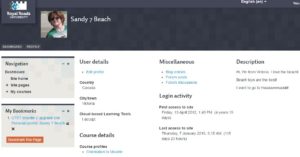
First…Your Moodle Profile
You learned how to create/edit your Moodle Profile in the LaunchPad course.
Now, personalize it a bit more by doing these 3 things:
- Write a short paragraph that describes you, professionally (your experience and skills, and perhaps even your educational background).
- Add a short paragraph that describes you a bit more personally (such as where you are from, where you live now, your interests, etc. – things you are comfortable sharing).
- Upload a photo (most people upload a picture of themselves, but if you prefer, you can use a photo of something else to represent you).
Keep paragraphs to approximately 100 words each.
Note: This profile will be available from within all of your RRU courses in Moodle. You will be able to update it at any time.
Part 2: Video
Use your computer’s webcam, your phone, or whatever technology you prefer to record a short (2- to 5-minute) video that expands upon and enhances what you posted in your profile. Alternately, you can use an application like Powtoon, or another application of your choice. Follow these prompts in your video message:
- This is my favourite… (room, town, school, outdoor space, other location)
- What motivated me to enrol in this program…. (TIP: Your personal statement might help to focus your thinking.)
- When I consider working in teams in this program…
- I think…
- I feel…
- I expect…
- I know that I work well in a team when…
- Some of my goals for the next 2 to 5 years are…
- One of my favourite books (or movies) is____________. It impacted me in the following ways…
ACTION: Post your video to a hosting site that gives you a link you can share. Copy the link, and post it in the Moodle Getting to Know You forum. Videos can be uploaded to YouTube or Vimeo for example. For other apps like Powtoon, recordings will stay on their server, but they will also give you a link that you can share.
When you post the link in the Moodle Getting to Know You forum, add a short note answering this question: Did you try a new application, or is this something you have done many times before?
Here are some resources to help you get started:
Upload a video into YouTube – Word doc will open
Part 3: Who is Who
Let’s talk. View your colleagues’ profiles and posts in the Getting to Know You forum.
ACTION: Reply to several of the posts with an observation or question. Read, and possibly respond to, the replies to your own post.
Part 4: Who do we Want to be?
Think about what you have learned about your colleagues in the Moodle Getting to Know You forum. What are the similarities and differences you observed? What are likely to be your strengths as a group?
ACTION: Summarize your thoughts by posting a brief paragraph or two in Our Learning Community forum answering, Who are we, as a cohort?
Activity 3 | Creating an Annotated Bibliography of Virtual Team Resources
Team Activity
Being able to be an effective virtual team member is a skill set that is essential in the knowledge age, and it is a key component of the MACAL/GDCAL experience. Each course that you take in your program will have a team assignment that will require you to connect, collaborate, and create a final product. Communication style, collaboration approaches, and strategies and methods for building relationships are all essential components of effective virtual teamwork.
This activity has been designed so that you can build and enhance your existing expertise in working in virtual teams. We also want you to have the opportunity at the front end of your program to search out and critically examine virtual team resources that may be useful to you as you move forward in your learning and your work.
Part 1: Make your initial connection with your team by posting in the Team Connection Forum (Team) in Moodle. Use this forum to say hello to your team members, and come to agreement on the technologies and online tools you will use to communicate and to collaborate synchronously and asynchronously. Setting up clear lines of communication is an essential first step to building a strong team. You can also use this forum to share a bit about your experience with teamwork, what you are looking forward to in your work with this team, and any other relevant information you would like your team to know about you.
The effectiveness of your team dialogue in this forum will directly impact your team’s ability to complete Part 2 of the activity. Go to the Team Connection Forum (Team) in Moodle to find the specific questions on what to discuss in this forum, and what you need to decide on as a team.
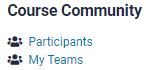
You can find out who is on your team by going to the Moodle site main page. On the right you will see Course Community, and under that, My Teams.
Part 2: As a team, your task is to create an annotated bibliography of your team’s top five resources that can be useful for working effectively in virtual teams. The resources your team identifies should not be technology tools, but rather process-based and peer-reviewed resources that you can find in the library database or other academic search engine (i.e. Google Scholar). The resources that you find need to speak to the ways in which you can increase your own personal and team effectiveness working in virtual teams. Summarize the articles as much as possible.
After creating the annotated bibliography, your team will also together write a one paragraph summary (maximum 250 words) of your team’s experience of collaboration. What did you discover about working together to create a product? What went well? What would you do differently next time?
- For tips on team writing, see Team Writing.
- The Writing Centre has this link to Writing an Annotated Bibliography. Use Example 2 for this activity, and summarize the articles. Please note, the writing style of the MACAL and DipCAL programs is APA 7th edition. You are expected to use the APA 7th edition style in all of your writing in the program. The annotated bibliography should be formatted in APA style, in Times New Roman font, and double-spaced. Find out more about APA style.
- Moodle Ask a Librarian: For support, searching tips and tricks, and answers to any questions you may have about your individual or team research, you can ask a librarian at this webpage.
Tips for a Collaborative Team Process:
- Use the Virtual Team Resources Discussion Forum in Moodle to work collaboratively together.
- You can choose to have team meetings in your student Zoom room or meet using another online meeting platform.
- As a team, decide on a process for completing the annotated bibliography.
- Some past teams have done some initial sharing/brainstorming, and then gone off individually in the library database or other academic search engine (i.e. Google Scholar) to find their best five “working in virtual teams” resources. They have then come together again as a team to report out and determine which ones will make the team’s top five. From there they have then discussed how to do the creation of the final document, etc.
- Other teams have scheduled a time for an initial synchronous meeting to plan, then worked asynchronously on a shared document, and then met to review, discuss, and finalize the product.
Choose an approach that works for your team and meets your team’s needs – this is a great opportunity to experiment with a collaborative team process, and you will have many opportunities to refine your approaches as you move through this program.
- Upload your team’s final annotated bibliography (with an APA-style cover page), and the one-paragraph summary (maximum 250 words) of your team’s experience including what tools you used to collaborate and the effectiveness of your team collaboration to the Moodle Posting Your Annotated Bibliography Forum by the date listed in the Schedule.
- Over the course of your program, take some time to review the documents that have been uploaded by other teams into this forum. They will provide a wealth of resources for you as you move forward to working in a variety of virtual teams in and beyond your Royal Roads program. You have access to this course, Connections, throughout your program.
Activity 4 | MACAL Website and program documents
Although most of the work you will do in the MACAL/GDCAL Program will be on Moodle, and therefore behind a firewall (requiring a password to access) the MACAL/GDCAL were created with open learning in mind as a fundamental concept. An open learning design philosophy centres around teaching and learning in a way that increasingly focuses on democratizing and decolonializing education, empowering learners, improving access to learning and promoting advocacy towards a social justice view of learning.
The MACAL Program Website is hosted on WordPress and is accessible to anyone. It is also your ‘go to’ for information on the program and program resources (e.g., policies, ethics forms, thesis documents) and other resources that support your learning (e.g., blogs, climate related webinar recordings) and links to sites and information (e.g., CanAdapt, sites of interest) that can contribute to building your climate action networks.
The MACAL/GDCAL program are designed to support your emerging competencies as a climate action leader. This includes understanding the range of competencies required by those working in this space of climate action, and developing a professional portfolio that provides others with insights into who you are as a leader and professional. These objectives are supported by the Climate Action Competency Framework, and a Portfolio approach to learning.
- Go to the MACAL Program Website and familiarize yourself with the site including the blogs, the events page, the job board and other resources.
- Review the following Program Documents and recordings.
Activity 4 Assignment: How do I want to present myself as a climate action leader?
After reviewing the above documents, answer the questions below in one or two sentences and then submit to the Moodle DropBox. Answer the following prompts in a short narrative [500 words] that describes who and how you want to be as a leader of climate action. In answering these prompts, consider the above resources and how these inform your answers?
Be sure to click ADD SUBMISSION and then SAVE CHANGES to submit your assignment in the dropbox.
Prompts:
- What is your overall goal and purpose for entering into the MACAL/GDCAL program?
- What values underlie your decision to enter this program?
- What kind of competencies do you bring to the program and what kind of competencies or competency areas do you want to develop as you go through the program?
- What kind of climate action professional do you see yourself being or becoming? (think about what passions drive you in this work, and how you hope to inspire others to take action)
Remember to include a title page that has the name of the assignment (above), the course name (MACAL Connections), your name, date.
Activity 5 | Moodle Resources
Please ensure that you have reviewed the following resources. Links to each of these can be found on the Moodle Connections Resources page.
- the Student Services Overview PowerPoint Video, the Services for Students webpage, and the Indigenous Student Services video
- the RRU Student Rights and Responsibilities webpage, the RRU Policies and Procedures webpage, and the RRU Webspace Terms of Use.
- the RRU Academic Regulations webpage, the Life of a Grad Student video, the Accessibility Services PowerPoint, and the Financial Aid & Awards video
Complete Week 1 Quiz
ACTION: When you have completed all requirements for Week 1, take the quiz on Moodle.